How do I assign a Genre to my Radio Station?
Each Radio Station in your account can be assigned a Genre. This is helpful if you have multiple Radio Stations and you want your users to be able to filter your stations by Genre.
To assign a Genre to your Radio Station:
To assign a Genre to your Radio Station:
- Go to the Radio Stations section in your BV account: https://www.bvmobileapps.com/services/rs
- Click Edit next to the Station that you want to update
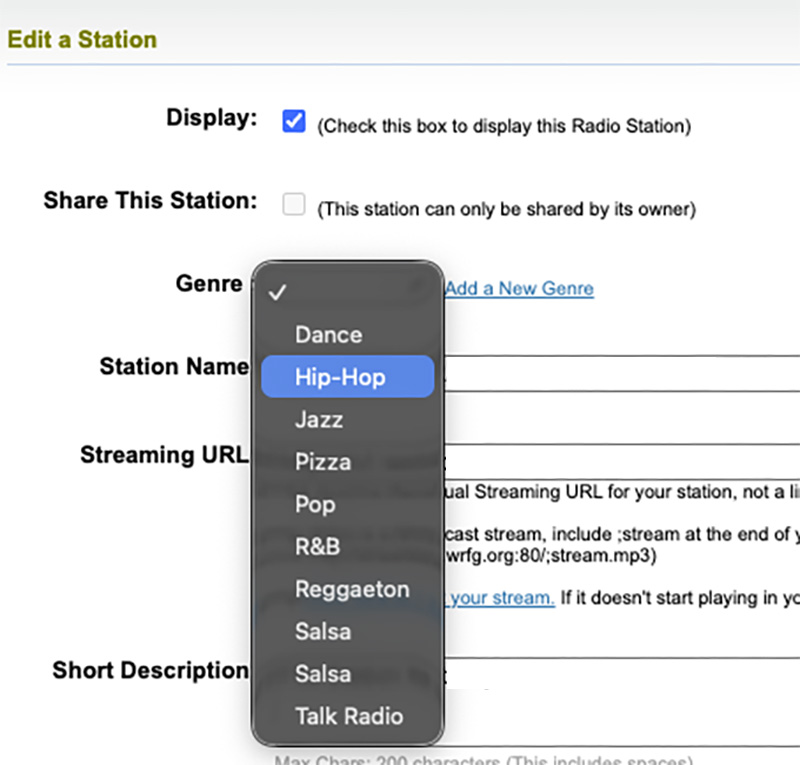
- Select the Genre in the list. If the Genre that want doesn't appear in the list, click the Add a New Genre link next to the Drop-Down.
- Click Submit at the bottom of the page.
Related Questions
Have more questions?
We can help you by phone or email. Contact Us

- 5686 Fulton Industrial Blvd SW, #44671
Atlanta, GA 30336 


About BV Mobile Apps
BV Mobile Apps is a mobile app development/hosting company. We specialize in creating apps for the entertainment industry. BV was founded by Gerald Olivari and Marshall Lyons. We're based in Atlanta.
Read more
© 2026 BV Mobile Apps, Inc. All rights reserved. Terms & Conditions | Privacy Policy